Blog
How to choose digital marketing WordPress themes that convert: a step-by-step checklist for freelancers and agencies

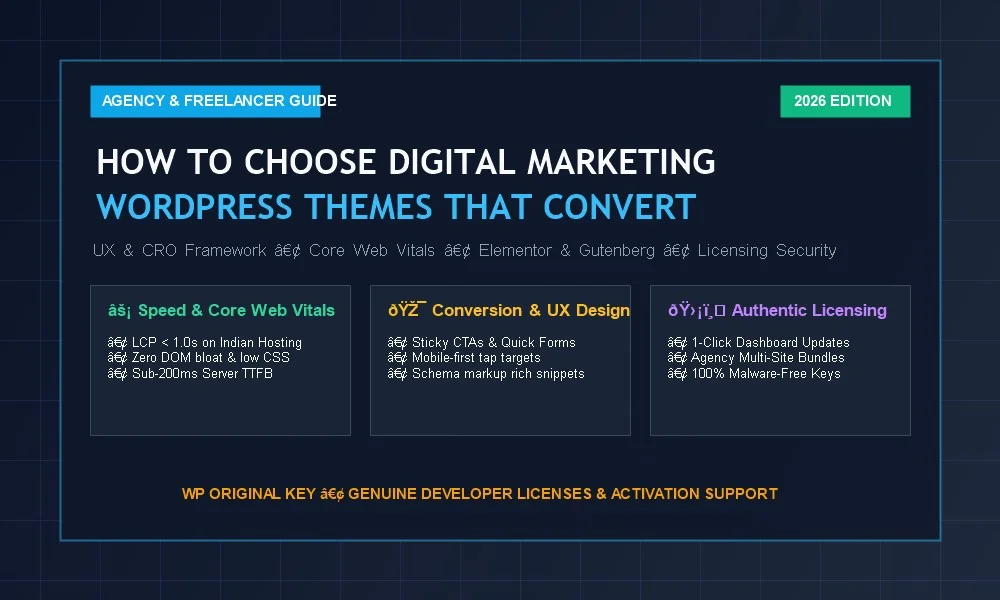
For digital marketing agencies, SEO consultants, and freelance web designers, your website is not merely a digital portfolio—it is your primary lead generation engine. Yet thousands of marketing firms launch on visually dazzling WordPress themes only to discover abysmal conversion rates, sluggish mobile page speeds, and plummeting Google search rankings. The culprit? Choosing a theme based on flashy surface aesthetics rather than technical performance, user psychology, and conversion architecture. In this comprehensive guide, we break down exactly how to evaluate, choose, and customize digital marketing wordpress themes that generate qualified client leads, pass Google Core Web Vitals with flying colors, and scale reliably across multi-client agency workflows.
| Evaluation Pillar | What Amateurs Look For | What Conversion-Focused Agencies Require |
|---|---|---|
| Design & Layout | Parallax sliders, heavy hover effects, flashy entrance animations | F-pattern visual hierarchy, sticky call-to-actions, clear lead paths |
| Speed & Performance | Looks fast on high-speed office desktop Wi-Fi | Sub-1.0s Mobile LCP, INP < 50ms, lean DOM tree (<15 levels) |
| Builder Flexibility | Locked into proprietary visual builder frameworks | Native Gutenberg or Elementor Pro compatibility with zero bloat |
| Structured Schema | Relies on third-party snippet code injection | Clean hooks for JSON-LD LocalBusiness, Service, & Review schema |
| Licensing & Updates | Unverified GPL clubs or nulled copies with hidden malware | 100% genuine developer license keys with 1-click dashboard auto-updates |
1. The Conversion Psychology: Why Pretty Themes Frequently Fail to Convert
When prospective clients land on a digital marketing agency’s website—whether seeking local SEO services, enterprise PPC management, or full-funnel content marketing—they arrive with high commercial intent and minimal patience. Eye-tracking usability studies consistently reveal that business decision-makers make an instinctual credibility assessment in under 50 milliseconds.
Themes designed primarily for creative graphic design studios often commit fatal Conversion Rate Optimization (CRO) errors:
- Vague Above-the-Fold Messaging: Replacing concise value propositions with generic headlines like “We Craft Digital Dreams” accompanied by heavy background video loops that slow page rendering.
- Buried Call-to-Actions (CTAs): Forcing prospects to hunt through hamburger menus to request an audit or proposal quote.
- Cognitive Friction: Overwhelming visitors with ten competing service packages rather than guiding them toward a singular introductory consultation step.
- Weak Social Proof Hierarchy: Positioning client testimonials and case study statistics at the absolute bottom of long pages where fewer than 20% of visitors ever scroll.
High-converting digital marketing wordpress themes prioritize clarity over cleverness. They deliver immediate value statements, prominently display trust badges, and offer accessible conversion pathways on both desktop and mobile viewports.
2. Core Web Vitals & Technical SEO: The Hidden Ranking Engine
Google’s Core Web Vitals algorithm directly correlates site speed and visual stability with organic rankings. If your agency sells SEO or performance marketing services, having a slow website damages your organic discoverability and instantly destroys client credibility.
When auditing potential WordPress themes, evaluate these three technical performance parameters:
A. Document Object Model (DOM) Depth & Clean Markup
Many legacy multipurpose agency themes wrap every text block inside 10 to 15 layers of nested <div> containers. Excessive DOM depth consumes massive memory on budget mobile devices and delays Googlebot’s crawl efficiency. Leading lightweight solutions like Astra Pro and modern block engines like Spectra Pro keep DOM depth exceptionally shallow, ensuring lightning-fast rendering. For a complete technical breakdown, check out our comparative guide on Spectra Pro vs Elementor Pro for Core Web Vitals.
B. Interaction to Next Paint (INP) Optimization
Google replaced FID with INP to assess page responsiveness to taps, clicks, and key presses. Themes that bundle huge monolithic JavaScript libraries (such as uncompressed jQuery plugins, heavyweight sliders, and parallax scripts) lock the browser’s main execution thread, causing severe input lag. High-converting themes rely on vanilla JavaScript or lightweight CSS transitions, ensuring INP remains below 50 milliseconds.
C. Native Schema.org Structured Data Readiness
Digital marketing sites require structured data to win rich search snippets—including star ratings, FAQ dropdowns, and LocalBusiness entity maps. While some specialized themes include built-in schema (as explored in our SEOWP WordPress Theme Review), the cleanest agency approach is selecting a theme with unpolluted header hooks that integrates natively with Schema Pro. Learn how to implement this in our comprehensive WordPress Schema Markup Guide.
3. Page Builder Compatibility: Elementor Pro vs. Native Gutenberg
The choice of page-building framework dictates long-term development speed and site maintenance. In 2026, two primary development workflows dominate professional marketing agencies:
Workflow A: Elementor Pro + High-Performance Starter Themes
For design-driven agencies that need rapid custom landing page generation, dynamic WooCommerce product layouts, and visual popup builders, pairing an ultra-lightweight base theme (like Astra Pro or Hello Elementor) with an authentic Elementor Pro License Key remains the industry gold standard. Agencies can further expand their design capabilities with 90+ creative widgets via Essential Addons for Elementor Pro (read our complete Essential Addons Review).
Workflow B: Native WordPress Block Editor (Gutenberg) + Spectra Pro
For agencies prioritizing pure speed scores (98–100 Mobile Lighthouse) and minimal plugin footprints, full-site editing with native Gutenberg blocks powered by Spectra Pro offers unmatched code efficiency. Block themes generate zero external JavaScript dependencies for basic grid and layout elements, delivering near-instant mobile load times.
4. Essential Marketing & Conversion Plugin Integrations
A digital marketing theme must integrate seamlessly with your core conversion stack. Before purchasing any theme license, ensure clean compatibility with these four essential plugin classes:
- Social Proof & FOMO Boosters: Displaying live client sign-ups and real-time review alerts via NotificationX Pro increases agency landing page conversions by up to 25%. Ensure your theme styling does not conflict with floating notification popups.
- Lead Capture & Form Modals: Conversion rates drop sharply if contact forms fail on mobile. Ensure full styling support for multi-step form plugins (WPForms, Fluent Forms, Gravity Forms) and dedicated exit-intent lead capture tools like Convert Pro.
- High-Speed Caching & Server Optimization: Verify that the theme allows CSS minification, JS deferral, and Critical CSS generation under LiteSpeed Cache, WP Rocket, or server-level Nginx caching without breaking responsive navigation menus.
- Productized Services via WooCommerce: If your agency packages services into recurring retainers, audit packages, or backlink outreach tiers, the theme must provide clean WooCommerce templates with optimized, distraction-free checkout pages.
Discover our complete recommended agency toolkit in our in-depth analysis of the Top 10 Essential WordPress Plugins for Agencies.
5. Demo Import Workflows: How to Avoid Database Bloat
One of the biggest traps freelancers and agencies fall into is importing bloated “All-in-One” demo packages. Most multipurpose theme demos import hundreds of dummy blog posts, dozens of unused contact forms, megabytes of uncompressed sample images, and complex third-party sliders that permanently pollute your WordPress database.
To maintain a clean, high-performance client build, adopt the Selective Starter Template Workflow:
- Utilize curated, modular starter template ecosystems such as Astra Premium Starter Templates.
- Import only specific landing page templates or block patterns rather than entire monolithic demo databases.
- Immediately clean up transient options, orphaned post revisions, and unused custom post types prior to staging deployment.
6. Real-World Theme Case Studies: Which Theme Fits Your Model?
To help you select the ideal candidate for your upcoming project, here is how the top contenders compare in production agency environments:
| Theme Solution | Core Strengths | Best Use Case | Agency Rating |
|---|---|---|---|
| Astra Pro | Sub-50KB vanilla payload, 100+ starter templates, deep WooCommerce hooks | Full-service marketing agencies, high-traffic client sites | ⭐ 4.9/5 (Read Comparison) |
| SEOWP | Built-in local schema, marketing proposal calculators, ranking showcases | Specialized SEO consultants, local search agencies | ⭐ 4.8/5 (Read Review) |
| Hello Elementor + Pro | Clean canvas, zero opinionated styling, total visual design freedom | Custom design studios, high-end bespoke client builds | ⭐ 4.7/5 (Activation Guide) |
| Spectra Pro + Astra | Pure Gutenberg blocks, 99+ PageSpeed scores, zero jQuery dependencies | Performance-first agencies, Core Web Vitals optimization retainers | ⭐ 4.9/5 |
7. The Agency & Freelancer Operational Checklist
Before standardizing on a theme framework for client delivery, use this systematic checklist to ensure smooth development, staging, and handoff workflows:
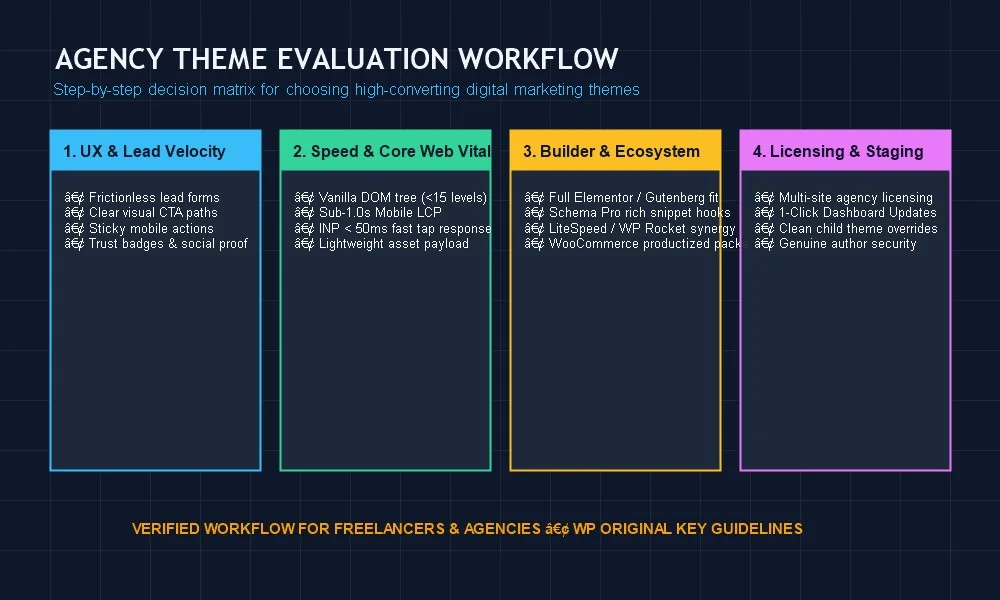
Checklist Item 1: Multi-Site & Agency Licensing Portability
Does the theme vendor provide scalable agency bundles? Purchasing single retail licenses for every client site quickly erodes agency margins. Utilizing verified developer agency bundles enables profitable client site delivery while guaranteeing legitimate license keys for each project.
Checklist Item 2: Staging & Localhost Development Support
Ensure license keys support development domains (e.g., .local, staging.yourdomain.com) without consuming production activation slots. Reliable tools allow seamless license transfer from local staging to client production domains.
Checklist Item 3: Child Theme Architecture
Never customize core theme files directly. Confirm the theme provides an official, clean child theme generator so custom PHP filters, hook overrides, and tracking scripts remain intact during automated theme updates.
Checklist Item 4: White-Labeling Capabilities
Premium agency themes (such as Astra Pro) include built-in white-label settings. This lets you replace the theme developer’s branding with your agency name, logo, and support links inside the client’s WordPress dashboard, reinforcing brand prestige.
8. The Critical Security Trap: Why “Nulled” Themes Ruin Agency Reputations
Freelancers and emerging agencies are frequently tempted by “GPL download clubs” or pirated nulled theme archives promising free access to premium themes. Falling into this trap is one of the quickest ways to destroy an agency’s business reputation:
- Dormant Malware & SEO Poisoning: Nulled themes almost universally contain obfuscated PHP base64 scripts, backdoor shells, or cloaked spam backlinks that trigger when your client’s site starts gaining organic traffic.
- Google Search Blacklisting: Once Google detects malicious scripts or cloaked spam backlinks, Google Safe Browsing slaps a red warning screen across your client’s URL, wiping out search rankings and leaving your agency exposed to severe legal liabilities.
- Blocked Dashboard Auto-Updates: WordPress and PHP evolve rapidly. Nulled themes lack authentic license handshakes, meaning you cannot update from Dashboard > Updates. When WordPress core updates, a pirated theme breaks, causing client site downtime. Read our full technical breakdown in our Dashboard Auto-Updates Architecture Guide and GPL vs Original License Key Comparison.
9. Why WP Original Key is the Trusted Partner for Agencies & Freelancers
Building client websites profitably should not require risking your agency’s reputation on unsafe pirated files. WP Original Key bridges the gap between commercial affordability and uncompromising security by providing 100% authentic, verified developer license keys directly to agencies, webmasters, and freelancers.
- 100% Authentic Developer License Keys: Complete peace of mind with original, unmodified files direct from the author. Zero malware, zero adware, and zero backdoors.
- Seamless One-Click Dashboard Auto-Updates: Receive security patches and new theme features directly inside WordPress with a single click.
- Agency Bulk Bundles: Maximize profit margins across multiple client deployments with affordable multi-site packages for Astra Pro, Elementor Pro, and Schema Pro.
- Dedicated Technical Activation Support: Enjoy rapid one-site setup assistance and troubleshooting support from verified WordPress professionals.
Frequently Asked Questions (FAQ)
What is the fastest digital marketing WordPress theme?
Astra Pro and GeneratePress lead industry speed benchmarks. When configured with minimal plugins and hosted on LiteSpeed or optimized Nginx servers, both themes achieve sub-0.8s mobile Largest Contentful Paint (LCP) and perfect 100/100 PageSpeed scores.
Should digital marketing agencies use Elementor or Gutenberg in 2026?
If you require complex interactive landing pages, custom popup triggers, and rapid visual design iteration, Elementor Pro is the top choice. If pure speed, zero script dependencies, and native Core Web Vitals optimization are your primary goals, Gutenberg paired with Spectra Pro is ideal.
Can I white-label my digital marketing theme for clients?
Yes. Premium themes like Astra Pro include white-labeling features that allow you to rebrand the theme under your agency name, replace author URLs, and present a seamless custom client experience.
Conclusion: Build for Conversions, Build for Growth
Choosing the right digital marketing wordpress themes is a strategic business decision that determines your site’s conversion velocity, organic search rankings, and long-term client retention. Prioritize clean DOM architecture, sub-second mobile performance, seamless builder compatibility, and strict conversion UX over superficial visual bloat.
When you are ready to equip your agency with legitimate tools that update securely and protect your client relationships, choose WP Original Key for authentic developer license keys, agency bundles, and dedicated activation support.
Agency Scaling Tip: Standardizing your agency stack across multiple client projects? Read our guide on the Best Agency WP Themes for Scaling Client Projects.


