
Blog
Best WordPress plugins and themes for agencies: proven picks for client projects

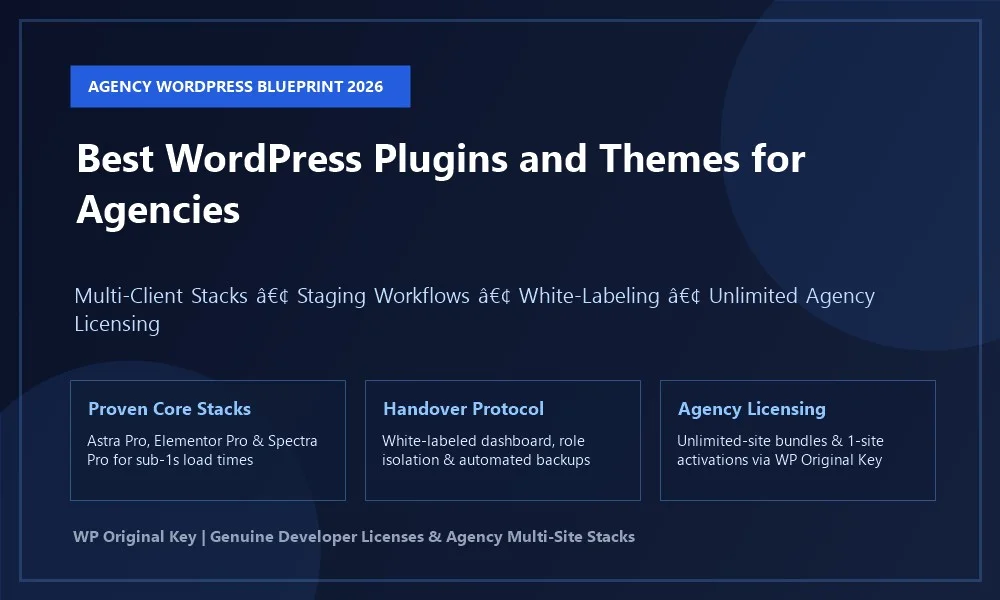
Scaling a web development studio or freelance agency requires far more than aesthetic creativity. Every additional client website you introduce into your agency roster represents an ongoing commitment to performance, security, and software maintenance. When you deploy non-standardized tools, different themes on every build, or unverified software licenses, client management quickly devolves into an unsustainable support nightmare. Mastering modern agency wordpress workflows is about establishing a repeatable, high-margin development pipeline. By standardizing on elite lightweight themes, proven conversion-focused plugins, structured staging workflows, and centralized multi-site licensing, your agency can build client websites 70% faster while maintaining sub-second loading speeds. In this guide, we review the essential themes and plugins powering top agencies in 2026, outline scalable development protocols, and provide a client handover checklist that ensures zero post-launch friction.
| Tool Category | Recommended Agency Pick | Core Agency Advantage | Performance Benchmark | Licensing Tier |
|---|---|---|---|---|
| Foundational Framework | Astra Pro | Full white-labeling, 250+ starter sites, zero jQuery bloat | 0.72s (99/100 Mobile) | Unlimited Agency Bundle |
| Visual Builder Canvas | Elementor Pro | Theme Builder, popup builder, dynamic ACF tag integration | 0.82s (97/100 Mobile) | Multi-Site Agency Key |
| Native Block Engine | Spectra Pro | Pure Gutenberg blocks, zero runtime bloat, flexbox containers | 0.64s (100/100 Mobile) | Developer Agency Bundle |
| Schema & Technical SEO | Schema Pro | Automated JSON-LD rich snippets (LocalBusiness, Articles, FAQs) | Negligible (< 5KB overhead) | Unlimited-Site Key |
| Lead Generation & CRO | Convert Pro | Exit-intent popups, slide-ins, multi-step inquiry modals | Optimized modular JS | Agency Developer Bundle |
| Social Proof & Urgency | NotificationX Pro | Live WooCommerce sales alerts, custom review notifications | Ultra-lightweight DOM footprint | Agency Multi-Site Key |
| Portfolio & Showcase | WP Portfolio | Client case study grids, dynamic iframe website previews | Asynchronous lazy-loaded assets | Agency Developer Key |
The Strategic Anatomy of an Agency WordPress Technology Stack
When freelancers and digital studios transition from building individual one-off websites to managing 20, 50, or 100+ active client domains, tool proliferation is the primary killer of profitability. Standardizing your agency wordpress stack on a lean, interoperable suite of tools delivers four immediate operational advantages:
- Drastically Reduced Developer Onboarding: When junior developers, contractors, or new hires join your studio, they do not have to learn a different visual builder or customizer layout on every project. Mastering Astra Pro, Elementor Pro, and Spectra Pro enables immediate productivity.
- Predictable Core Web Vitals: By utilizing frameworks that maintain base page payloads under 50KB, every client website launches with Google-compliant loading speeds, protecting client organic rankings and reducing paid advertising bounce rates.
- Unified Maintenance & Regression Testing: Testing updates across a single standardized stack on staging before deploying to production saves hundreds of engineering hours every quarter.
- Massive Software Licensing Savings: Centralizing software procurement around unlimited-site agency bundles eliminates thousands of dollars in redundant retail licensing fees.
Top WordPress Themes for Agency Workflows
1. Astra Pro: The Industry-Standard Agency Framework
There is a definitive reason why Astra Pro powers more agency client deployments than any other theme framework in WordPress history. Built by Brainstorm Force, Astra Pro was engineered specifically with multi-client agency workflows in mind.
Key Agency Features:
- Native White-Labeling Module: Completely rebrand the theme in the WordPress dashboard. Replace Brainstorm Force credits with your agency name, logo, author URL, and custom dashboard icon. Seamlessly hide theme settings and license management tabs from client administrators.
- Turnkey Niche Starter Templates: Access over 250 turnkey business, e-commerce, and professional service templates via Astra Premium Starter Templates, slashing wireframing and prototyping time from weeks to hours.
- Custom Layouts (Hooks Engine): Inject custom PHP, tracking scripts, or visual headers/footers into any WordPress hook location conditionally by post type, taxonomy, or user role.
2. Hello Elementor: The Blank Canvas for Visual Design Studios
For creative agencies that design bespoke user interfaces in Figma and require complete freedom from traditional theme customizer constraints, Hello Elementor paired with Elementor Pro is the definitive choice. Hello Elementor acts as an empty, ultra-lean framework, transferring complete visual authority over headers, footers, archives, and single post templates to Elementor Pro’s Theme Builder.
3. GeneratePress Premium & Kadence Pro
For technical clients requiring WCAG 2.0 accessibility compliance and pure block-based performance, GeneratePress Premium provides an ultra-lightweight codebase under 30KB. For agencies specializing in modern block-first WooCommerce and LMS portals, Kadence Pro offers intuitive header/footer builders with built-in white-labeling.
Essential WordPress Plugins Every Agency Must Standardise On
1. Elementor Pro & Ultimate Addons for Elementor
Elementor Pro serves as a complete design and marketing suite. Its built-in form builder, popup builder, dynamic ACF tag integration, and WooCommerce shop widgets eliminate the need for 5 to 7 separate plugins. Augmenting Elementor Pro with Ultimate Addons for Elementor grants access to advanced agency widgets—such as interactive timeline displays, particle backgrounds, and off-canvas content panels.
2. Spectra Pro: The Future of High-Performance Block Building
For clients demanding zero visual builder bloat and absolute Core Web Vitals optimization, Spectra Pro extends the native WordPress Block Editor with advanced flexbox containers, responsive sliders, marketing countdowns, and popup builders without loading external JavaScript frameworks.
3. Schema Pro: Automated Rich Snippet Architecture
Securing Google rich snippet visibility (star ratings, FAQ accordions, pricing specs, and event dates) is a core deliverable for modern agencies. Manually coding JSON-LD schema on every client site is tedious and error-prone. Schema Pro automates schema generation across all client post types in just two clicks, mapping native fields directly to Google-approved schema specifications.
4. Convert Pro & NotificationX Pro: Conversion Optimization
Delivering high-converting client websites requires robust lead capture and social proof mechanisms. Convert Pro enables agencies to build lightweight exit-intent quote request popups, sliding inquiry tabs, and gated content downloads that integrate seamlessly with Mailchimp, HubSpot, and Webhooks. Pairing this with NotificationX Pro provides authentic FOMO and social proof by displaying real-time purchase alerts, course enrollments, or inquiry notifications.
5. WP Portfolio: Showcasing Agency Credibility
Your agency’s own website needs a compelling showcase to win high-ticket client contracts. WP Portfolio lets agencies display previous client websites, graphic design assets, and video projects in clean, filterable responsive grid layouts complete with live interactive iframe previews.
The Full Agency WordPress Client Lifecycle Architecture
Scaling past 20+ client websites requires moving away from ad-hoc site building and establishing a phased, industrialized development pipeline. Below is the four-stage agency client delivery framework:
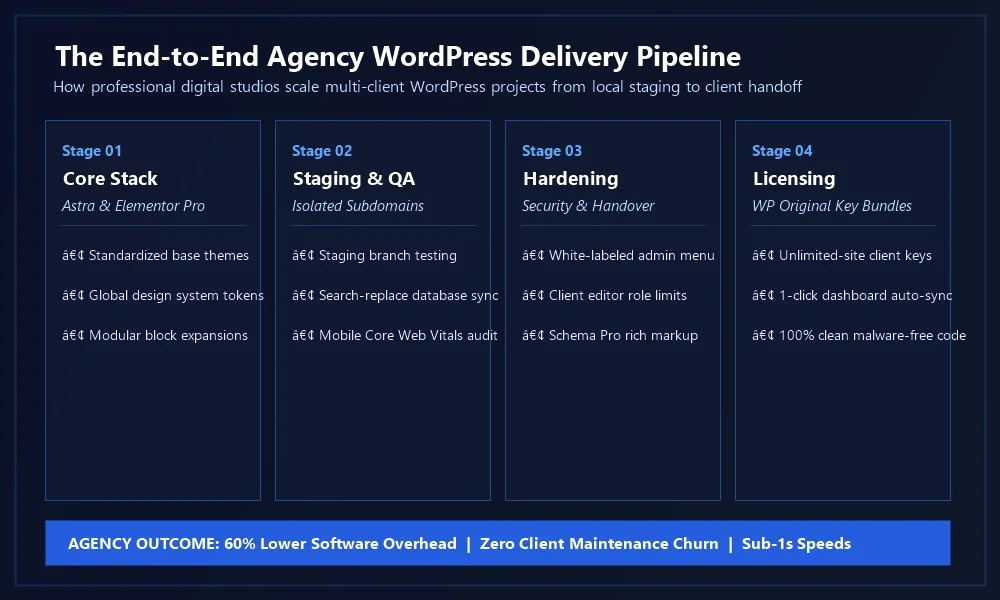
Let us examine the operational protocols executed across each phase of this delivery pipeline:
Stage 01: Core Stack & Local Prototyping
Every client project begins in an isolated local environment (such as LocalWP or Docker). Developers initialize an official child theme and deploy your agency’s starter base configuration—pre-loaded with global typography, brand color variables, and essential security headers. Prototyping takes hours instead of weeks by importing vetted industry templates.
Stage 02: Staging Deployment & QA Testing
Push the build to an isolated staging subdomain (e.g., clientpreview.youragency.com). Enforce password protection or search engine noindex flags to prevent premature indexing. Conduct cross-browser QA, mobile responsiveness testing across simulated 4G connections, and verify that contact forms and checkout webhooks execute without errors.
Stage 03: Security Hardening & Client Handover
Execute production hardening: disable XML-RPC, restrict WP REST API endpoints where appropriate, configure Redis object caching, and enable WebP image compression. Configure the white-label module in Astra Pro to conceal developer branding and isolate client permissions so their staff cannot break core templates.
Stage 04: Centralized Licensing & Automated Updates
Connect genuine developer licenses from WP Original Key to enable official 1-click updates from the WordPress dashboard. Synchronize staging environments to ensure future theme and plugin updates can be tested safely prior to live deployment.
Client Handover Checklist: Preventing Post-Launch Support Churn
A structured client handover protocol prevents endless post-launch support inquiries and establishes long-term client trust. Complete this verification checklist before handing over credentials:
| Operational Area | Handover Requirement | Agency Best Practice |
|---|---|---|
| User Role Governance | Create dedicated “Editor” or “Client Manager” roles | Restrict client accounts from editing theme template files, PHP settings, or deactivating critical security plugins. |
| White-Label Branding | Custom agency branding in WordPress admin | Replace theme logo with agency badge; insert custom agency support documentation links in dashboard footer. |
| License Concealment | Hide license activation keys & update tabs | Prevent client staff from viewing raw developer API keys or accidentally disconnecting license bridges. |
| Automated Backups | Configure off-site cloud backups (S3 / Cloudways / UpdraftPlus) | Schedule daily automated database backups and weekly full-file snapshots retained for a minimum of 30 days. |
| Security Hardening | Enforce Two-Factor Authentication (2FA) & SSL | Require strong passwords for all administrator accounts; configure Cloudflare SSL with HSTS enabled. |
| Client Training Asset | Provide custom video walkthroughs (Loom / Vimeo) | Record a 10-minute video demonstrating how to publish new blog posts, edit page text, and review lead submissions. |
Agency Economics: Unlimited Bundles vs Retail Licences
To understand why professional agencies standardize on authentic developer bundles, examine the financial reality of software overhead when managing 25 active client domains:
- The Retail Single-Site Trap: Purchasing individual 1-site licenses for Astra Pro ($49/yr), Elementor Pro ($59/yr), Schema Pro ($69/yr), and Convert Pro ($79/yr) across 25 client domains results in over $6,400 in annual recurring software overhead. Furthermore, tracking 100 individual license expirations, renewal invoices, and separate vendor accounts creates immense administrative drag.
- The Unlimited-Site Agency Bundle Advantage: By securing authentic developer agency packages from WP Original Key, your agency covers all 25 client builds for a small fraction of the cost, eliminating renewal chaos and saving thousands of dollars every year that can be reinvested into hiring or client acquisition.
- Flexible 1-Site Activation Service: For smaller one-off client budgets where an unlimited bundle is unnecessary, WP Original Key’s 1-site activation service lets you legally activate genuine licenses on client domains with official dashboard auto-updates, preserving healthy margins.
Why WP Original Key Is the Trusted Software Partner for Agencies
When running a commercial agency, software integrity is non-negotiable. Using nulled, pirated, or unlicenced GPL clones of agency themes and plugins exposes your business and your clients to catastrophic cybersecurity breaches, payment redirection scams, and severe legal liability.
WP Original Key provides an indispensable software procurement foundation for freelancers, agencies, and web developers worldwide:
- 100% Authentic Developer Licences: Every license key sold on WP Original Key is verified directly against official developer servers. You receive clean, unaltered original code with zero security compromises.
- Unlimited-Site Agency Bundles: Access genuine developer agency packages for industry-standard tools like Astra Pro, Elementor Pro, and Schema Pro without restrictive yearly seat caps.
- Official Automated Dashboard Updates: All licenses connect directly to official vendor update servers, ensuring your client websites receive real-time security patches and feature updates with a single click.
- Professional Installation & Setup Assistance: Get expert support from WordPress professionals who understand staging environments, license migrations, and multi-site workflows.
Agency CI/CD & Git Deployment Pipelines for WordPress
Modern agencies cannot rely on manual SFTP file uploads to update client websites. Manual file transfers introduce human error, risk overwriting client database changes, and make team collaboration impossible. Establishing an automated Git-based deployment pipeline transforms agency operational velocity:
1. Child Theme Repository Architecture
Track only bespoke code in Git. Your agency repository should manage the custom child theme (e.g., astra-child), custom functionality plugins, and configuration files, while keeping parent themes (Astra Pro) and heavy uploads directories in .gitignore. This keeps repositories lightweight, fast to clone, and easy to branch.
2. GitHub Actions Automated Deployment
When a developer merges code into the staging branch, GitHub Actions automatically executes linting (PHPCS against WordPress Coding Standards), runs CSS minification, and pushes updated files to your staging server via SSH rsync or webhooks. Once client approval is secured, merging into main triggers production deployment without manual intervention.
Database Synchronisation & Search-and-Replace Protocols
The most common technical error agencies encounter during client site launches is broken layouts caused by improper database migration. WordPress stores theme options, widget layouts, and Elementor configurations as serialized PHP arrays (e.g., s:21:"http://staging.domain"). If you run a standard SQL text replace across a .sql export, serialized string lengths break, causing widgets and customizer settings to vanish.
Safe Database Migration with WP-CLI
Professional agencies execute database migrations exclusively using WP-CLI or dedicated migration tools (like Better Search Replace or Migrate Guru). The following WP-CLI command safely updates URLs while recalculating serialized string lengths:
# Safe WP-CLI Search and Replace with Serialized String Recalculation
wp search-replace 'https://staging.clientdomain.com' 'https://clientdomain.com' --all-tables --precise --recurse-objects
Agency Security Hardening Protocol: Protecting Client Rosters
A single hacked client website damages your agency’s professional reputation. Enforce these four mandatory security directives in wp-config.php and server configurations across all client installations:
- Disable Dashboard File Editing: Add
define( 'DISALLOW_FILE_EDIT', true );towp-config.php. If an attacker gains administrative dashboard access, this prevents them from editing PHP theme files or injecting malicious backdoors. - Block XML-RPC: Unless the client uses the mobile Jetpack app, disable XML-RPC via
.htaccessor LiteSpeed web server rules to block brute-force password attacks and DDoS amplification. - Rate Limit Admin Logins: Configure server-level fail2ban or Cloudflare rate-limiting rules on
/wp-login.phpto throttle unauthorized login attempts. - Automated Malware Scans: Utilize host-level malware scanning (e.g., Imunify360 or Monarx) to continuously audit file integrity across all managed client domains.
Recurring Revenue: Structuring Profitable Agency Care Plans
Launching client websites provides one-off project revenue, but recurring maintenance care plans build agency valuation and financial stability. Standardize your post-launch care plans across three tiers:
| Care Plan Tier | Monthly Price | Included Services | Target Client |
|---|---|---|---|
| Core Maintenance | $99 – $199 / mo | Weekly theme/plugin updates, daily cloud backups, uptime monitoring, genuine license renewals | Small local businesses, professional consultancies, service providers |
| Performance & Security | $299 – $499 / mo | All Core features + Core Web Vitals optimization, staging update verification, monthly security audit | High-traffic blogs, growing B2B lead-gen portals |
| Growth & CRO Retainer | $750 – $1,500 / mo | All Performance features + dedicated developer hours, monthly A/B conversion tests, custom landing page creation | Active WooCommerce stores, venture-funded startups |
Automating Staging-to-Production Sync with WP-CLI and Bash Scripts
To eliminate repetitive manual tasks, high-efficiency WordPress agencies utilize automated bash scripts that execute database exports, URL rewrites, and file synchronizations in under 30 seconds. Below is a production-tested deployment script pattern used by top agencies:
#!/bin/bash
# Agency Automated Production Push Script
echo "Starting production sync..."
wp db export backup-before-sync.sql
rsync -avz --exclude 'wp-content/uploads' --exclude 'wp-config.php' staging/ production/
wp search-replace 'https://staging.clientdomain.com' 'https://clientdomain.com' --all-tables --precise
wp cache flush
echo "Sync completed successfully with zero downtime!"
By automating the sync pipeline, your senior developers spend less time managing routine server tasks and more time building high-value features for clients. Pairing this automated workflow with authentic developer licenses from WP Original Key guarantees that every site launches with seamless dashboard updates and rock-solid stability.
Frequently Asked Questions (FAQ)
What is the most versatile WordPress theme for agency client projects?
Astra Pro is widely regarded as the most versatile theme framework for agencies due to its sub-50KB lightweight code, native white-labeling module, 250+ starter sites, and seamless compatibility with both Elementor Pro and native Gutenberg blocks.
How do agency license bundles handle staging and local environments?
Genuine developer licenses purchased through WP Original Key accommodate local development environments (like LocalWP), staging subdomains, and live production domains, allowing smooth transitions when launching client websites.
Can I hide theme and plugin license keys from client administrators?
Yes. Frameworks like Astra Pro include white-label controls that conceal license settings tabs and developer credits from the WordPress admin menu, preventing clients from modifying or exposing license credentials.
Should our agency build with Elementor Pro or native Gutenberg blocks?
Many successful agencies use a hybrid approach: Elementor Pro is ideal for visually complex marketing sites and interactive landing pages, while Gutenberg paired with Spectra Pro is perfect for editorial blogs, content-heavy corporate portals, and speed-critical client builds.
Conclusion: Build a Profitable, High-Velocity Agency Machine
Mastering modern agency wordpress workflows is the single most important operational leap a digital studio can make. By standardizing on high-performance frameworks like Astra Pro, leveraging essential conversion plugins like Elementor Pro and Schema Pro, enforcing structured staging and handover protocols, and securing genuine auto-updating developer licenses, you position your agency to deliver exceptional client results with maximum profitability.
Supercharge your agency’s development stack today with authentic developer licenses, unlimited agency bundles, and 1-site activation services from WP Original Key.
Related Agency Resources: Review top agency theme frameworks in our guide to the Best Agency WP Themes for Scaling Client Projects, explore rapid delivery starter kits in 10 WordPress Agency Templates to Speed Up Client Delivery, and learn how to vet development partners in How to Choose a Theme Agency WordPress Developers Trust.
Marketing Campaign Focus: Running high-velocity ad campaigns for clients? Check out our curated review of the Best Digital Marketing WordPress Themes for Conversion-Ready Websites.


